
Reporting an outage
By Text
Texting is the fastest way to report and check outages.
-
Text OUT to 844-551-6903 to report an outage
-
Text STATUS to 844-551-6903 to check outage updates
Note: Members must have their current phone number on file to use texting. If you have multiple accounts, please report outages by phone or through SmartHub.
*Members will need to update the outage text phone number to 844-551-6903
By Phone
Call us at 218-732-3377 or toll-free at 888-713-3377.
-
During business hours (8:00 a.m. – 4:30 p.m.), our office staff will assist you and connect you to the outage system
-
After hours, you’ll be directed to our automated outage reporting system
Tip: Calling from a phone number on file helps us quickly locate your service address. If we can’t match your number, you’ll be prompted to enter outage details manually.
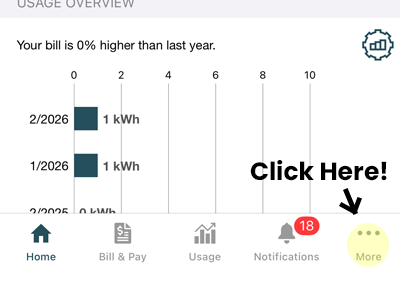
By SmartHub App
-
Open the SmartHub app and login
-
Tap “More”
-
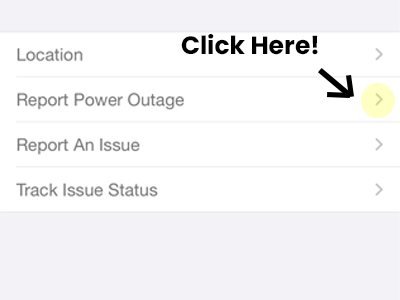
Select “Report Power Outage”
-
Choose your service location
By SmartHub webpage
-
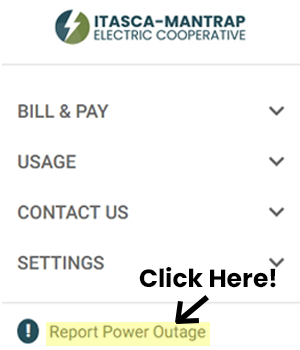
Open the SmartHub webpage and login
-
Click “Report Power Outage”
-
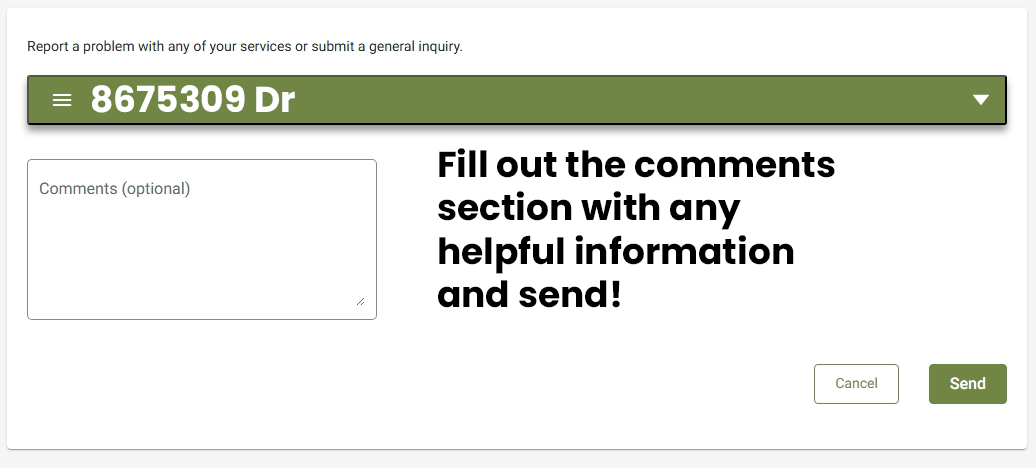
Choose your service location
Before You Report an Outage
A quick check can save you time:
-
Check your breakers to make sure one hasn’t tripped
-
Check your meter display to see if it’s blank
-
Check with neighbors to see if they’re also without power
This helps determine if the issue is inside your home or on our lines.
Itasca-Mantrap crews work hard to restore outages as quickly and safely as possible. We appreciate your cooperation and patience during these times.
See where the outages are taking place near you: